 Add to Chrome
 Add to Edge
Google Maps Scraper
Google Maps Scraper allows you to extract data from Google Maps and export it to CSV, JSON, or Excel formats. It supports collecting detailed information such as reviews, images, phone numbers, email addresses, and social media profiles.
Get started - it's free
We have 10,000+ satisfied customers and provide
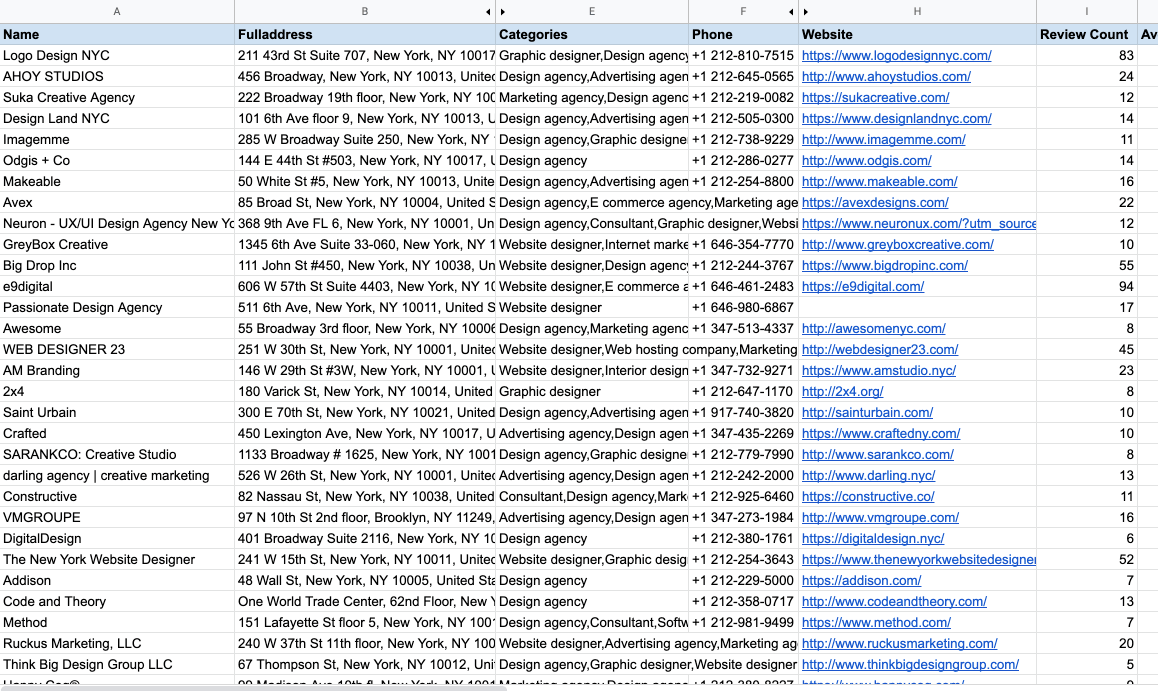
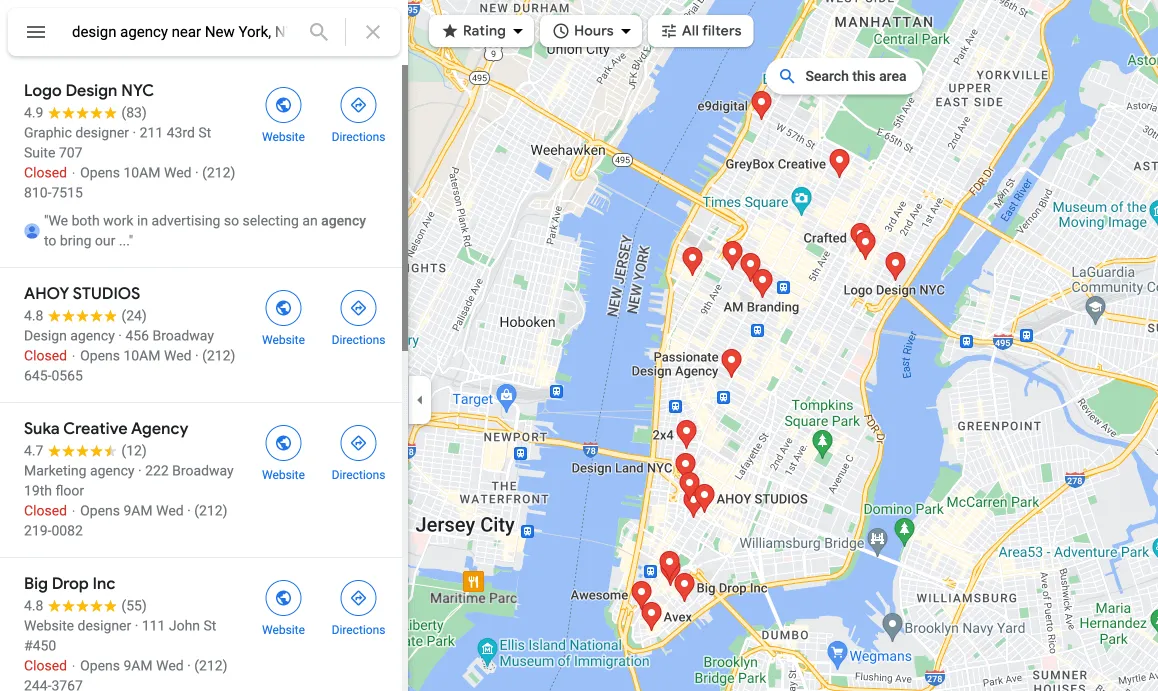
G Maps Extractor extracts business leads and export data to excel file.
Lead Generation
Extracts business listing data like names, emails, and phone numbers that can be used to generate sales leads and grow your customer database.
Get StartedMarket Research
Pulls competitor information, analyzes industry trends, monitors online reputation, and provides other market insights.
Get StartedData Automation
Scrapes large amounts of listing data from Google Maps with one click and exports to spreadsheet for analysis. Saves time vs manual copying.
Get StartedHow to use Map Lead Scraper Chrome Extension
Search On Google Maps
Enter keywords to locate local businesses in a location
- Work from any location, from regional to community
Open The Chrome Extension
Very easy to start your crawl
- Just a few seconds to complete
Export Your Results
Support for CSV / XLS files and unlimited export
- Support for emails and numbers, etc
What Types of Data can be extracted with G Map Lead Scraper
The following table lists all supported data fields.
| Data Fields | Description |
|---|---|
| Name | Name of the place on Google Maps, this is usually the canonicalized business name. |
| Phone | The place's phone number in its local format. |
| Email address | The place's email scraped from the internet. |
| Social Medias | The social media profile URLs found from the internet (Facebook, Instagram, LinkedIn, Youtube, Yelp, Twitter, and so on). |
| Website | The authoritative website for this place, such as a business' homepage. |
| Domain | The web domain associated with the place. |
| Full address | The complete, readable address of the place. |
| Street | The specific street where the place is located. |
| Municipality | The governing municipality where the place is situated. |
| Categories | The categories associated with the place on Google My Business. |
| Claimed | Indicates if the Google My Business profile has been claimed, allowing verification and editing of business information on Google. |
| Price | The price range of the place, rated from $ (lowest) to $$$$ (highest). |
| Plus code | Plus codes serve as alternative addressing in areas lacking traditional addresses, such as unnumbered buildings or unnamed streets. |
| Review Count | The cumulative count of reviews for the place. |
| Reviews | User-written reviews about the place. |
| Review URL | The dedicated URL where customers can leave reviews for the place. |
| Photos | User-uploaded photos related to the place. |
| Average Rating | The overall rating of the place, ranging from 1.0 to 5.0, determined by user reviews. |
| Google Maps URL | The official Google Maps link for the place. |
| Google Knowledge URL | The URL for the Google Knowledge Panel associated with the place, which provides information when searching for entities in the Google Knowledge Graph. |
| Latitude | The geographic latitude of the place, expressed in decimal degrees. |
| Longitude | The geographic longitude of the place, expressed in decimal degrees. |
| Opening hours | The specified hours during which the place is open to the public. |
| Featured image | A highlighted photo representing the place or business. |
| Cid | A unique identifier assigned by Google to a specific business entity. |
| Place Id | A unique textual identifier that distinguishes a specific place. |
| Kgmid | An identifier used specifically for the Google Knowledge Graph API. |
Pricing Plans
Loading pricing plans...
They use Map Lead Scraper daily with
Google Maps Scraper has proven to be an incredibly reliable tool. It consistently delivers valuable leads from local businesses that have greatly aided our marketing efforts. I couldn't recommend it more!
This tool is a game-changer. Its user-friendly interface and one-click operation have streamlined our lead generation process immensely. Truly, Google Maps Scraper is as convenient as it gets.
Fantastic tool! It works precisely as advertised, saving me countless hours in data collection. A huge shout-out to the developers for creating such a time-saving tool!
Google Maps Scraper has become an indispensable part of my toolkit for B2B cold emails. It's a high-performing tool for scraping Google Maps data, and I use it daily. Simply irreplaceable.
I can't express how grateful I am for this incredible scraper. It's simple, efficient, doesn't require much disk space, and it's super easy to use. The customer support is also top-notch - they've exceeded all my expectations.
The interface is super simple and intuitive. Map Lead Scraper saves me countless hours I used to spend manually collecting and organizing leads.
Frequently asked questions
Have a different question about Map Lead Scraper and can't find the answer you're looking for? Reach out to our support team by sending us an email and we'll get back to you as soon as we can.
The extractor visits each business website found on Google Maps to look for a contact page or email address listed there. Emails aren't on Google Maps but are usually on the business site.
The Google Maps extractor is a browser extension/plugin that can run on any operating system, including Windows, macOS, Linux etc. As long as you have the Chrome browser installed and add the extension.
For large regions like a whole state, search smaller areas like cities or ZIP codes instead. Search 'Los Angeles restaurants' rather than 'California restaurants' for example.
Currently it only works for Google Maps, but we can create custom scrapers for other map sources if needed.
The paid version removes all record limits, unlocks more advanced functionality and includes automatic batch extraction. The free version is limited to 10 listings per search.
There you can cancel your current subscription. From within the extractor app, go to the settings menu and click 'Manage Subscription'. Or contact customer support via email and request to cancel your subscription.